
Test-Scanning QR Codes
Friday, January 16, 2026 (1:00 PM - 2:00 PM) (EST)
Description
Test-Scanning QR Codes for Event Check-in
- Click Events in the left-hand navigation panel.
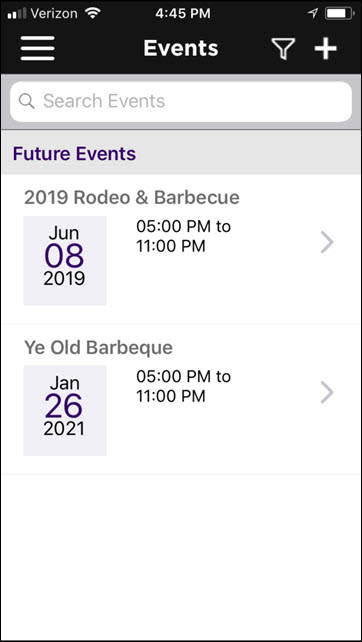
- Click the
 to select Today as your filter for events.
 - Select the desired event from the list.
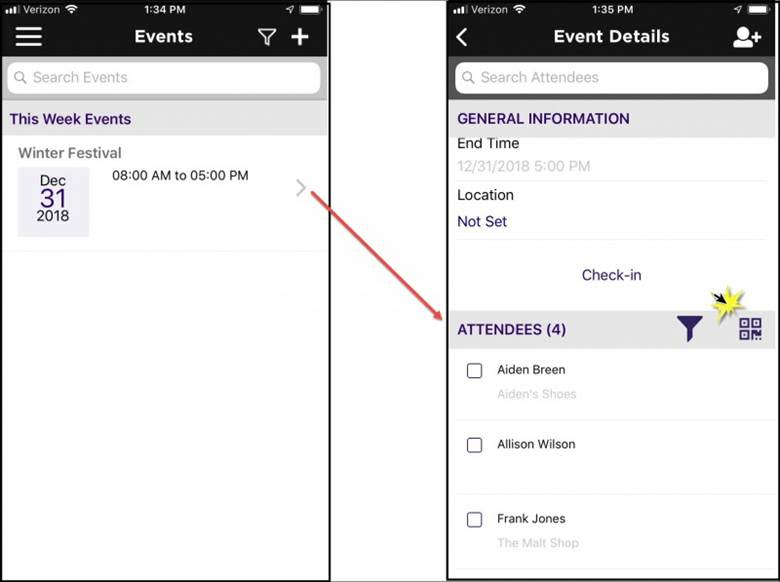
- In the Attendees section, click the Scan QR Code link

- Align your phone with the QR code. The QR code will be automatically scanned.
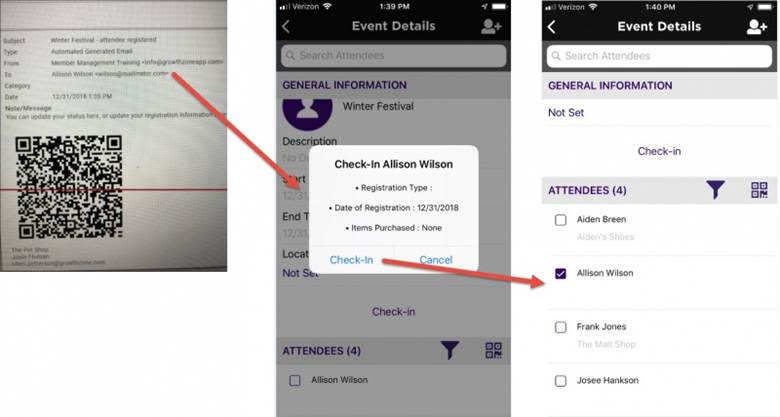
| NOTE: When checking in by QR codes, staff/reps must be using the Mobile Staff App, and logged in with their own login. Multiple devices may be used using the QR code scan. You CANNOT use BOTH devices AND laptops at the same time to check in as the laptops will overwrite the device results leaving inaccurate counts. |

CBIA Office
3200 Bailey Lane, Suite 110
Naples, FL 34105 United States
3200 Bailey Lane, Suite 110
Naples, FL 34105 United States
Friday, January 16, 2026 (1:00 PM - 2:00 PM)
(EST)
Registered Guests
4
4
Powered By GrowthZone